 ZZTool
Why My Instagram Captions Finally Stopped Looking Boring
Sometimes it’s honestly not your content that’s the problem — it’s how the text looks.
I used to think my Instagram posts were fine. The captions made sense, the message was clear, but somehow they still felt… boring. Same words, same font, same layout every time. People scroll fast, and plain text just disappears in the feed.
That’s when I started using two simple text tools that quietly made a big difference. They’re not complicated, not flashy, but once you get used to them, you’ll probably keep them bookmarked.
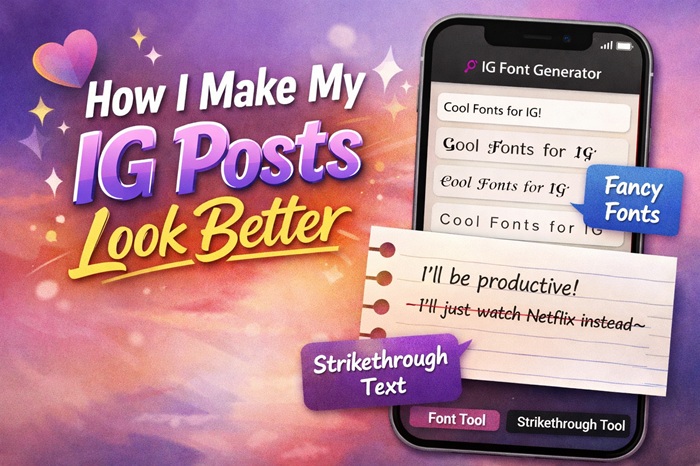
The first one is an Instagram font generator. You type in your normal text, and it instantly turns it into different font styles you can copy and paste anywhere. I mostly use it for Instagram bios, post titles, and short highlighted lines in captions. Here’s the tool: 👉
What I like about it is that the fonts aren’t just random symbols. Some of them actually look clean and readable, which matters if you don’t want your profile to look messy. A small change in font can make your name, headline, or CTA stand out without screaming for attention.
The second tool is a strikethrough text generator, and this one is surprisingly fun to use. If you’ve ever tried to manually add strikethrough text on social platforms, you know it’s annoying. This tool does it instantly — just type, copy, paste. You can try it here: 👉 https://www.886life.com/tools/strikethrough
Strikethrough text isn’t only for “deleting” something. It’s great for humor, contrast, or showing a change of thought. For example:
“I’m going to sleep early tonight and stay up scrolling until 2 AM.”
That little line instantly adds personality and makes the caption feel more human.
What I usually do now is combine both tools. I’ll use the IG font generator for a clean, eye-catching title, then add a strikethrough line somewhere in the caption for tone or humor. It takes maybe 30 seconds total, but the post looks way more intentional.
Another thing I appreciate is that both tools are completely free and don’t require sign-ups, downloads, or learning anything new. Open the page, paste your text, copy the result, and you’re done. That’s it.
If you’re a content creator, small business owner, or just someone who posts regularly on Instagram, Facebook, Threads, or X, these tools are genuinely useful. They don’t change what you say — they just help how it’s seen.
Sometimes all it takes is a small visual tweak to stop someone from scrolling. And for me, these two tools do exactly that, without overthinking it.
![Free Tile Quantity Calculator Tool [Recommended]](/assets/blog/2026/1787786513_7ee0db51.jpg)